Scan. Request. Tip. Accept. Play.
One whole gig night, from the QR code on the table to the recap after the last song.
Four steps, in any order.
Add your songs.
A title and artist is enough. Charts can come later.
Build a setlist.
The songs you plan to play, in order, with a break where a set ends.
Connect payouts.
About five minutes on Stripe's site, and tips go straight to you. Until then you can go live in Preview: requests are free and your crowd page says PREVIEW.
Go live.
At the venue, before you play: check your setlist, your name and tonight's rules, then tap Go Live.
Print a QR sign for the tables while you're at it. Bandmates skip all of this; they just enter the code you give them.
Five steps, every request.
Step 1 Scan.
Your crowd scans the QR code on the table or the stage, and your song list opens in their browser. No app, no login. It's your whole library, not just tonight's set, so nobody can ask for a song you don't know. Still learning one? Hide it.

Step 2 Request.
They pick a song and add a note if they want one. If a song's already been asked for as many times as you allow in a night, it says so and points them to another. You decide whether songs already in tonight's set can be requested.
Step 3 Tip.
$5, $10, $20 or a custom amount, by Apple Pay, Google Pay or card. Bigger tips move a song up the queue, and anyone can boost a song that's already in it. Want to tip without asking for a song? “Support Local Music” does that. Every tip lands in your own Stripe account.

Step 4 Accept.
On your tablet, a bell counts what's waiting. It never pops open mid-song. Between songs, tap it: each request shows its key, its tip, the note, and where it sits in tonight's set. Accept, and that chart is your next page, on every bandmate's tablet too. Already in your set? Leave it right where it is.
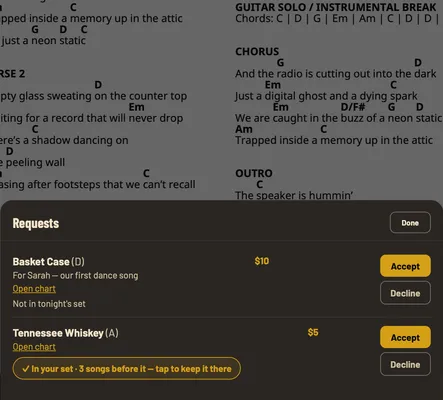
Step 5 Play.
When you get to it, a pop-up shows the note and the tip, so you can thank them (or wish Eric a happy birthday) before the count-in. Tap “Got it — play the song” and keep going. Your bandmates turn their own pages on the same set, and “Band in sync” along the bottom tells you everyone's there.

When the night winds down
Set breaks.
At the end of a set, your tablet shows “End of Set 1” and what's up next.

Last Call.
Tell it when the night wraps. Your crowd page shows a Last Call banner and how many more songs can still fit, and once your queue fills the time you have left, it stops taking new requests. No more taking a tip for a song you'll never get to.
Pack up.
End the gig from the last set's end card. Forget, and it ends on its own after 12 hours with no new requests.
After the last song
Tips, requests, songs played, and the ones people asked for that you never got to, plus every song in the order you played it. Tips reach your bank on Stripe's schedule, usually a couple of business days.
